Form endpoint
Send your site's form to your organization. Each submission with an email or a phone is stored, matched to a contact or turned into one, and can open a deal.
Availability: Available on Pro, Business and Enterprise, and during the 14-day trial, with the Marketing hub switched on. Compare plans
On this page
Send this site's form submissions to SalexHub too, after the form's own handling, not instead of it. The form key starts with slxf_ and is shown under Marketing > Forms. From the visitor's browser, POST the JSON body {"f": "<form key>", "v": {<fields>}} to https://app.salexhub.com/api/f/s?f=<form key>. The ?f= in the address is required from a browser. From a server, POST the same body to https://app.salexhub.com/api/f/s with the headers x-visitor-ip and x-visitor-ua, carrying the visitor's address (one address) and User-Agent. If a server key (sk_live_...) is available, send it as Authorization: Bearer <server key>, so each visitor counts on their own rather than the server as one sender. Never put the server key in a page. Name the fields email, phone and name where you can. Every submission needs an email or a phone. Each value is a string of up to 2,000 characters, a number, a boolean or null; the body is up to 64,000 bytes. The answer is JSON, never a redirect. {"ok": true} means the submission is stored, so do not send it again. {"ok": false} carries the reason it was refused; on "no_contact", ask the visitor for an email or a phone number. The full reference is https://salexhub.com/docs/developers/forms.md.
Keep the form your site already has, and send what a visitor submits to your organization. Each submission with an email or a phone is stored first, then matched to a contact by email or phone, or turned into a new contact, and it can open a deal.
Forms come with the Marketing hub. In a new organization, switch it on under Products in Settings > Organization > Billing, on a paid plan or during the 14-day trial.
Create the form#
Owners and Admins create forms under Marketing > Forms, with New form:
- Name, shown on the note the submission leaves;
- Site: one of your tracked sites, or Not bound to a site. A bound form accepts submissions only from that site, and a submission can bring the visits that led to it;
- Your field names: only needed for fields the product does not recognize on its own (below);
- Deal: Create a deal for each submission, with a title template such as
Booking: {{service}} on {{date}}.
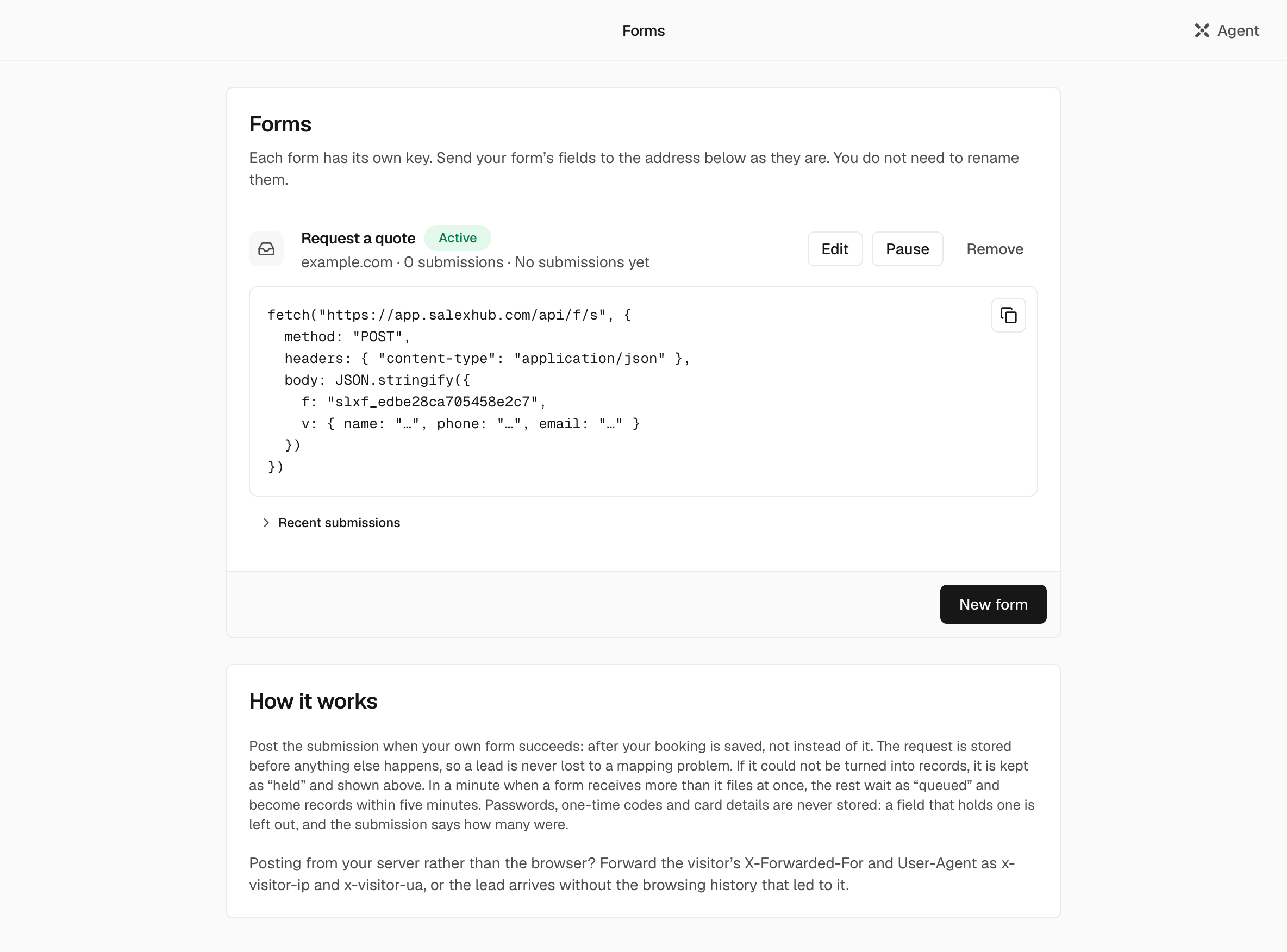
After Save, the form's row shows its key, which starts with slxf_, and Recent submissions lists the latest 20, each Filed, Held or Queued, with the reason one is held. Members who are not admins see only the submissions about contacts they can open.
Send a submission#
POST https://app.salexhub.com/api/f/s with a JSON body, exactly { "f": "<form key>", "v": { ... } }. Field names in v are up to 64 characters; a value is a string of up to 2,000 characters, a number, a boolean or null. The body may be up to 64,000 bytes. There is no redirect after a submission: the answer is JSON, so send it from script.
From the visitor's browser, put the key in the address too:
const FORM_KEY = "slxf_9c8b7a6f5e4d3c2b1a";

async function sendToSalexHub(fields) {
  // After your own form handling, not instead of it.
  const res = await fetch(`https://app.salexhub.com/api/f/s?f=${FORM_KEY}`, {
    method: "POST",
    headers: { "content-type": "application/json" },
    body: JSON.stringify({ f: FORM_KEY, v: fields }),
  });
  return res.json();
}

sendToSalexHub({ name: "Nadia Karim", email: "nadia@example.com", phone: "+971 50 123 4567", service: "Annual audit" });
Important: From a browser on your own site, the ?f= in the address is needed: the browser asks first whether the request is allowed, and that check finds the form only by ?f=. The sample on the product's Forms page leaves it out, and fails from a browser. Sending the body as text/plain also works, because a browser then does not ask first.
From your server, send the same body without ?f=, and pass the visitor's address and browser, or the new contact arrives without the visits that led to it. Without a server key, your server is one sender, so all its submissions share one sender's budget (Limits); with one, each visitor it names counts on their own:
await fetch("https://app.salexhub.com/api/f/s", {
  method: "POST",
  headers: {
    "content-type": "application/json",
    authorization: `Bearer ${process.env.SALEXHUB_SERVER_KEY}`, // optional: a server key, see below
    "x-visitor-ip": visitorIp, // the visitor's address, as your server saw it: one address
    "x-visitor-ua": visitorUserAgent, // the visitor's User-Agent
  },
  body: JSON.stringify({ f: "slxf_9c8b7a6f5e4d3c2b1a", v: { name: "Nadia Karim", email: "nadia@example.com" } }),
});curl https://app.salexhub.com/api/f/s \
-H "content-type: application/json" \
-H "authorization: Bearer $SALEXHUB_SERVER_KEY" \
-H "x-visitor-ip: 203.0.113.7" \
-d '{"f":"slxf_9c8b7a6f5e4d3c2b1a","v":{"name":"Nadia Karim","email":"nadia@example.com"}}'Server keys#
A server that posts for many visitors (your site's own backend, a booking system) can prove it serves your organization with a server key, and then each visitor it names in x-visitor-ip gets their own share of each form's minute instead of sharing the server's.
- Create one under Marketing > Forms > Server keys: name it after the server that will use it and choose Create key. The key starts with
sk_live_and is shown only once. Keep it with your server's secrets, never in a page a browser loads. Creating and revoking keys needs the security permission that API keys need (Owners and Admins hold it). - Send it as
Authorization: Bearer <server key>with every submission, and the visitor's address inx-visitor-ip: one address, as your server saw it. An IPv6 visitor is counted by their /64. - A key opens this endpoint for your organization's forms and nothing else: it calls no tool.
- A key never turns a submission away. One that has expired (a key lives a year), was revoked, belongs to another organization or lacks the server-key scope leaves your server counted as one sender, and the answer says so in its
x-salexhub-relay-keyheader:acceptedwhen the key counted,refusedwhen it did not. Watch forrefusedin your logs and replace the key. - Each form's own limit and the hour's ceiling still apply above the visitors (Limits).
Field names#
The product finds the person from three fields, by these names, and needs no mapping for them:
| Field | Names it recognizes |
|---|---|
email, e-mail, mail, clientEmail, customerEmail | |
| Phone | phone, tel, telephone, clientPhone, customerPhone |
| Name | name, fullName, clientName, customerName, first_name, firstName |
For other names, map your field to a contact property under Your field names. Each mapped field is written to the contact: an empty property is filled, and on a contact you already have, a different value waits as a suggestion for you to accept. Every other field is kept with the submission and written into the note on the contact.
Passwords, one-time codes and card details are never stored: a field that holds one is left out, and the submission says how many were.
What a submission creates#
The submission is stored#
As received, before anything else, so nothing that follows can lose it. A submission with neither an email nor a phone is not stored: it is refused with no_contact, so your site can ask the visitor for one.
The person is found or created#
By email when there is one, otherwise by phone. One match: that contact. No match: a new contact, with Source "Website". A submission that only looks like an existing contact, or could not be filed, is held, so no one is entered twice: under Recent submissions, an admin picks who it was Sent by, one of the contacts it looks like or A new contact, and chooses Attach.
The day's visits attach#
When the form is bound to a site and the submission carries an email, that day's visits from the same browser attach to the contact, and its traffic source is kept.
A deal opens, if you asked for one#
With the title from your template, Source "Website", and the contact as its primary contact.
A note is left#
On the contact: the form's name, then each field and its value.
Workflows on "submitted a form" run next, and each record created fires the record.created webhook.
Answers#
The answer says only whether the submission was stored, never whether the person was already a contact.
| Status | Body | Meaning |
|---|---|---|
200 | {"ok":true} | Stored: filed, held for someone on your team, or queued in a busy minute. Do not send it again. |
400 | {"ok":false,"reason":"no_contact"} | Neither an email nor a phone. Nothing is stored: ask the visitor for one. |
400 | {"ok":false,"reason":"shape"} | Not JSON, or not the shape above. |
400 | {"ok":false,"reason":"text"} | A field name or value holds a character that cannot be stored, such as a NUL. |
400 | {"ok":false,"reason":"unknown_form"} | An unknown, paused or removed key. |
400 | {"ok":false,"reason":"origin"} | A bound form, sent from another site. |
413 | {"ok":false,"reason":"shape"} | The body is over 64,000 bytes. |
429 | {"ok":false,"reason":"rate"} | Over this sender's 20 a minute for the form, or past the form's 1,200 queued in an hour. |
500 | {"ok":false,"reason":"error"} | Our failure, before the submission was stored. Send it again. |
Limits#
- A bound form accepts only its site's origin, and its subdomains, with
www.ignored. An unbound form accepts any origin. A request with noOrigin, such as one from your server, is accepted. - Each sender, known by the address the request comes from, gets 20 submissions a minute for each form. A server that sends a server key of the form's organization is counted by the visitor it names in
x-visitor-ipinstead. - Each form files up to 60 submissions a minute. Past that, a submission is stored, answered
200and shown as Queued, and a pass every five minutes files it at the form's pace. Past 1,200 queued in an hour, the answer is429. - There is no captcha: the site binding and the rate limits are the protection.